How AI Background Removal Works: Segmentation and Mattes Explained
A plain-language look at how AI background removal works: neural networks, image segmentation, alpha mattes, why hair is hard and how to get better results.
5 min read
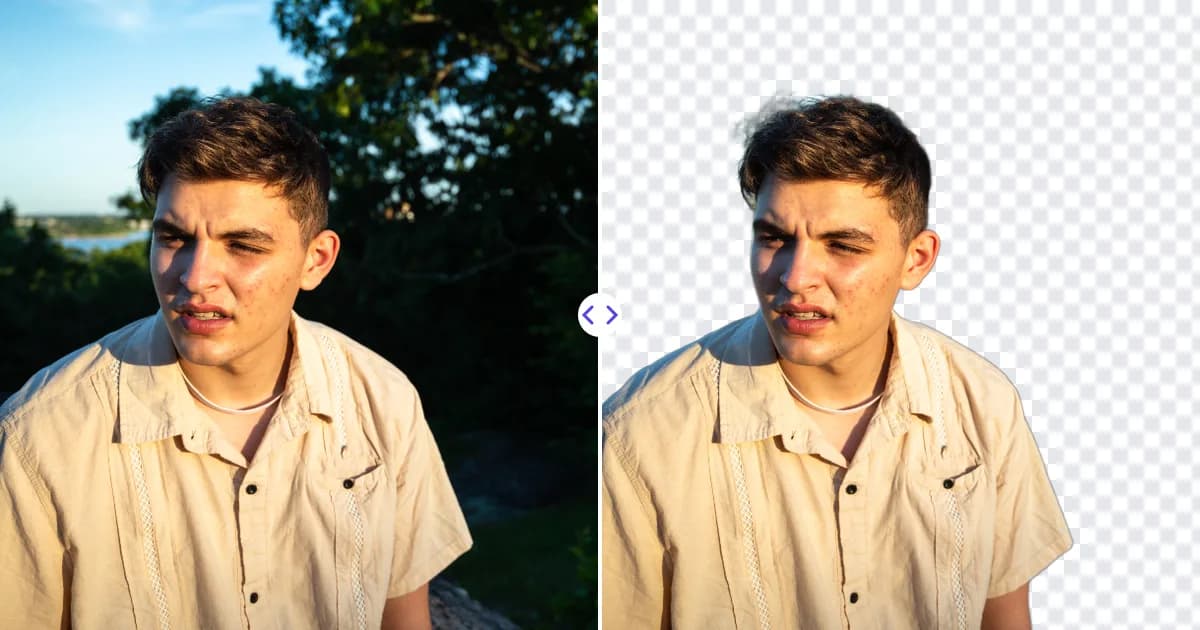
AI background removal works by running a photo through a neural network that has learned, from many example images, to recognize which pixels belong to the main subject and which belong to the background. The model outputs a mask - a grayscale map of how much each pixel belongs to the subject - and that mask becomes the transparency of the final PNG. The whole process happens automatically, without you tracing a single edge.
From manual tracing to automatic masks
Before AI tools, removing a background meant selecting the subject by hand. Designers used the pen tool to draw paths, magic-wand tools to grab areas of similar color, and brushes to paint masks. Color-based tools work well on flat studio backdrops but struggle with real-world photos where the background is busy or similar in color to the subject.
Machine learning changed this. Instead of relying on color alone, a neural network learns the shapes and context of objects: what a person, a shoe, a dog or a car usually looks like, and where its outline is likely to be.
Step 1: The image is prepared
When you upload a photo, it is typically resized to the resolution the model expects and its pixel values are normalized. Models work on a fixed or limited input size, so the system later scales the result back up to match your original image.
Step 2: The network analyzes the image
Most background removal models are convolutional neural networks or transformer-based networks designed for segmentation - the task of labeling each pixel. They usually have two halves:
- An encoder that progressively compresses the image into features, from simple edges and textures up to high-level concepts like "face" or "product".
- A decoder that expands those features back to full resolution, producing a per-pixel prediction.
Connections between the two halves pass fine detail from early layers to the output, which is important for accurate edges. Many background removal models are trained for salient object detection or dichotomous image segmentation - finding the most prominent object in the scene and separating it precisely from everything else.
Step 3: A mask is produced
The network's output is a mask the same shape as the image. Instead of a strict yes/no for each pixel, good models produce values between 0 and 1:
- 1 - definitely subject.
- 0 - definitely background.
- In between - edge pixels that are partly subject and partly background, such as strands of hair or a blurred outline.
This soft mask is called an alpha matte. Estimating these in-between values accurately is known as matting, and it is what separates a natural-looking cutout from one with harsh, jagged edges.
Step 4: The mask becomes transparency
Finally, the mask is scaled to the original image size and written into the alpha channel. The result is saved as a PNG, which can store that per-pixel opacity. Our article what is a transparent PNG explains alpha channels in more detail.
How models learn
A segmentation model is trained on large datasets of images paired with accurate masks created by people or by careful compositing. During training, the model makes predictions, compares them with the correct masks, and adjusts millions of internal parameters to reduce the error. After many rounds, it generalizes: it can produce masks for photos it has never seen.
The variety of the training data matters. A model trained mostly on portraits will be strong on people but may struggle with products, and vice versa. General-purpose background removers are trained on a broad mix of subjects - people, animals, products, vehicles and objects.
Why some photos are harder than others
Even strong models have predictable weak spots:
- Fine hair and fur. Thin strands mix subject and background in a single pixel. See how to cut out hair in photos for tips.
- Low contrast. A white product on a white table gives the model few visual clues about where the edge is.
- Transparent or reflective objects. Glass, water and shiny metal show the background through or on them.
- Ambiguous subjects. In a group photo or a cluttered scene, it may not be obvious which object is "the subject".
- Low resolution or blur. Missing detail makes edges uncertain. Enlarging a small source first with an AI upscaler can help.
Segmentation is not the same as object detection
It helps to separate two related ideas. Object detection draws a rectangle around things in an image and labels them, for example "dog" or "car". That is useful for counting or tagging, but a rectangle is far too coarse for a cutout. Segmentation works at the pixel level and produces an exact outline. Background removal needs segmentation plus matting: the outline tells the system which region is the subject, and the matte tells it how soft each edge pixel should be. This is why background removers can follow the curve of a shoulder or the gap between fingers instead of leaving a box-shaped patch of background behind.
Speed versus quality
Model designers balance accuracy against speed and memory. Larger models and higher input resolutions generally capture finer edges but take longer to run. Smaller models are faster but may miss fine detail. Some services, including Remove Photo Bg, run their models on their own servers rather than sending images to third-party AI services, which is worth considering when you work with private photos or unreleased products.
How to get the best results from AI background removal
- Make the subject clear. One main subject, fully in the frame, works best.
- Use contrast. Shoot against a background that differs in color and brightness from the subject.
- Keep it sharp. Good focus and lighting give the model clean edges to follow.
- Upload a good-sized image. Avoid tiny thumbnails or heavily compressed screenshots.
- Check the edges. Zoom in on hair, fingers and product corners before using the result.
Our guide on how to take photos that are easy to cut out goes deeper into shooting tips.
Related AI techniques
Background removal is one of several AI image tasks built on similar ideas. Inpainting fills a masked area with plausible content, which is how an object remover erases unwanted items. Super-resolution predicts missing detail to enlarge images, which is how AI upscaling works. You can read more in what is AI inpainting.
See it in action
AI background removal combines segmentation and matting to turn an ordinary photo into a clean cutout in one step. The best way to understand it is to try it: upload a photo to Remove Photo Bg and look at how the model handles the edges of your subject.