Car Photo Background Remover - Showroom-Style Vehicle Listings
Remove distracting driveways, parking lots and streets from car photos. AI cuts out the vehicle so you can present it on a clean, showroom-style background.
4 min read
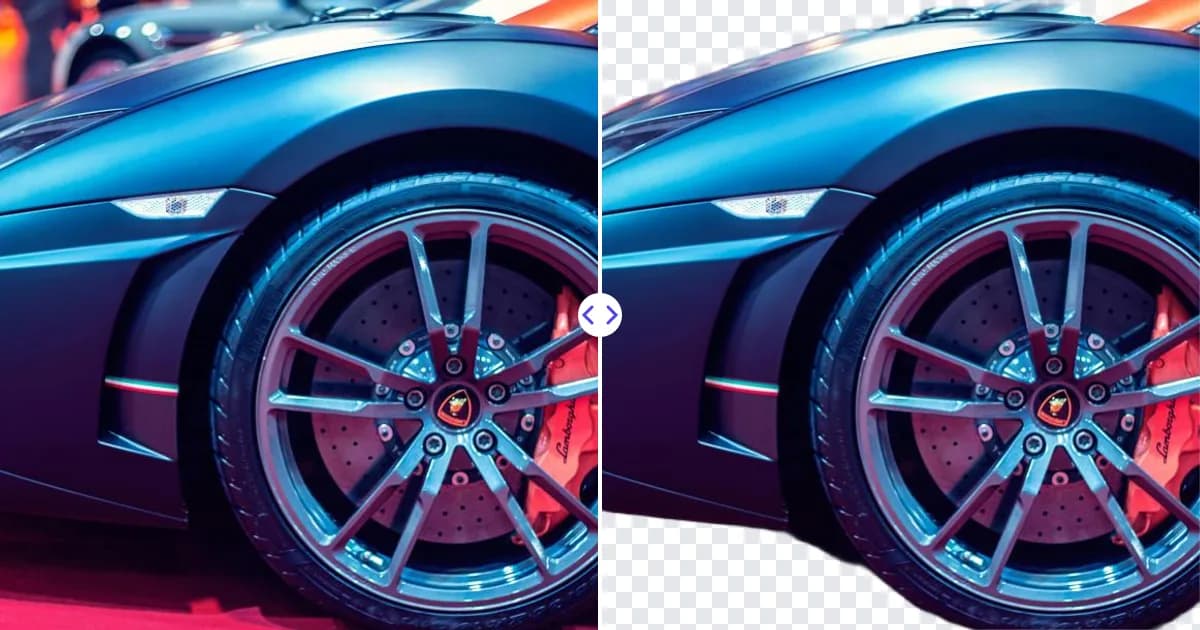
A car photo background remover lets you present a vehicle without the parking lot, garage door or neighbor's house behind it. Upload a car photo to the Remove Photo Bg background remover; the AI detects the vehicle, including wheels and mirrors, and removes everything around it. You download a transparent PNG and place the car on a clean studio-style backdrop, a branded dealership background or a simple solid color.
Why clean backgrounds sell cars
Buyers browse dozens of listings quickly. A car photographed in a cluttered lot competes with every other object in the frame, while a car on a clean backdrop draws the eye straight to its lines, color and condition. Uniform backgrounds also make an inventory page look organized, which helps a dealership or a private seller appear more professional.
How to remove the background from a car photo
- Photograph the car. Capture the full vehicle with a little space around it, in even daylight.
- Upload the photo. Add the JPG, JPEG, PNG or WEBP file (up to 16 MB) to the background remover.
- Check the details. Look at mirrors, antennas, spoilers and the gaps around the wheels.
- Place it on a new backdrop. Open the PNG in Canva, Photoshop or GIMP, add a background, add a soft shadow under the tires, and export.
Shooting tips for car cutouts
- Choose the right light. Overcast days or open shade give soft, even light and fewer harsh reflections than direct midday sun.
- Shoot the standard angles. Front three-quarter, side profile, rear three-quarter, front and rear are what buyers expect. Keep the same height and distance for each car.
- Leave room around the car. Do not crop bumpers or mirrors at the frame edge; cut-off parts cannot be restored later.
- Turn the wheels slightly. On front three-quarter shots, angle the front wheel so the rim faces the camera, a classic showroom pose.
- Park on an even surface. A level spot avoids tilted horizons that look odd once the car sits on a new background.
Handling the tricky parts of vehicles
Windows and glass
Car windows are see-through, so you may see the original background through them, such as trees or buildings visible through the side glass. For side profiles, this is usually least noticeable when the new background is similar in tone to what was originally behind the car.
Reflections in paint
Glossy paint mirrors its surroundings. The cutout keeps those reflections because they are part of the car's surface. Shoot in a plain, open area so reflections are neutral and do not clash with the new backdrop.
Shadows and ground contact
The original shadow is removed along with the ground. Without a shadow, the car can look like it is floating, so add a soft shadow under the tires and body in your editor.
Small parts
Antennas, roof racks and wing mirrors are thin details. Use a sharp, full-resolution photo to keep them intact.
Cleaning up before or after
Sometimes the problem is on the car or right next to it, not in the background. A cone beside the bumper or a sticker you no longer want shown can be removed with the object remover; see how to remove an object from a photo for the technique. Private sellers who prefer not to show their license plate can paint over it with the same tool, or read remove text from image for related tips.
Always keep listings honest: show scratches, dents and other real condition details clearly. Background editing should change the setting, not the vehicle.
Who uses car background removal
- Dealerships giving their whole inventory a consistent branded look.
- Private sellers making a driveway photo look like a proper listing.
- Rental and leasing companies showing fleet models on neutral backgrounds.
- Car enthusiasts and photographers creating posters, social posts and wallpapers.
The same principles apply to bikes, scooters and other large products; our product photo background remover page covers general catalog tips.
Why use AI for car photos
Masking a car by hand means tracing curves, mirrors and wheel arches precisely, which takes time for every photo. The AI does the cutout automatically in any modern browser, on desktop or mobile. It is free to use, and your photos are processed on our own servers rather than sent to third-party AI services.
Make your listing stand out: upload a car photo and remove the background.