Transparent Background Maker - Make Any Photo Background Clear
Make any photo background transparent online. Our AI transparent background maker isolates the subject so you can layer it over designs, slides and videos.
4 min read
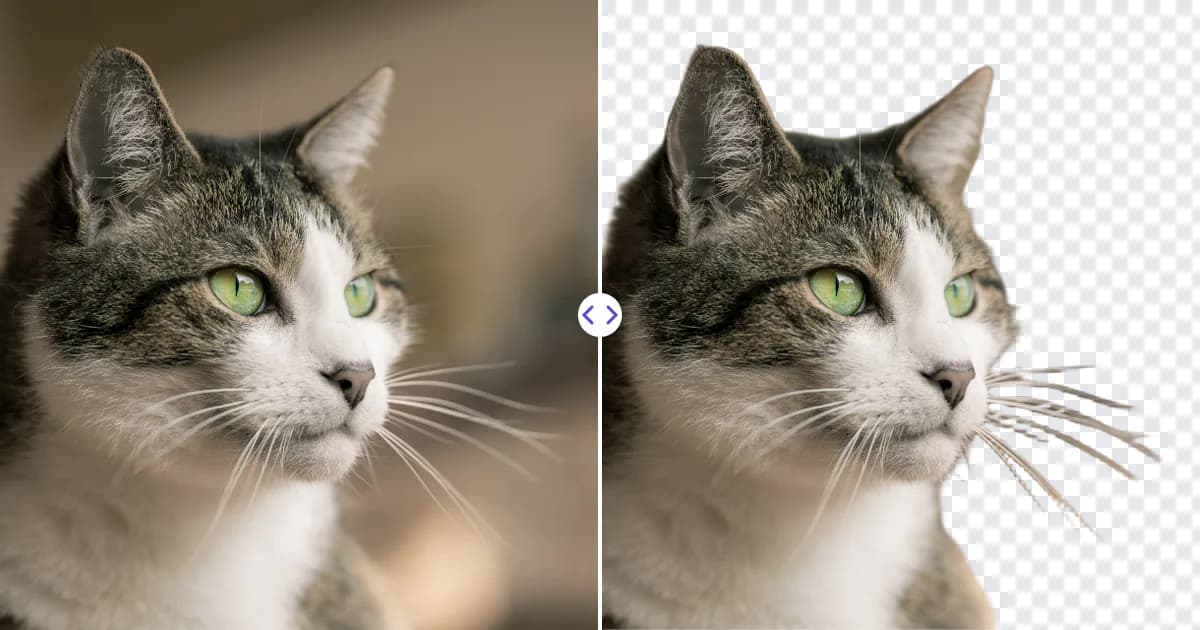
A transparent background maker turns everything behind your subject into empty, see-through space. Upload a photo to the Remove Photo Bg background remover and the AI detects the person, product or object, clears the background, and lets you download the result with full transparency. You can then layer the subject over any design without a box around it.
This page is about the layering side of the job: how transparency works, where it helps, and how to get a result that blends naturally into whatever you put it on.
What "transparent" really means
Every pixel in a digital image has color values. Formats that support transparency add a fourth value called the alpha channel, which says how opaque the pixel is. An alpha of 100% is solid, 0% is invisible, and anything in between is partly see-through.
When our tool makes a background transparent, it sets the alpha of background pixels to zero and keeps the subject solid. Along soft edges such as hair or fur, pixels get in-between values, so the subject fades into whatever is behind it instead of showing a jagged outline. Most editors display transparent areas as a gray-and-white checkerboard; that pattern is not part of the image, it is just how empty space is shown.
For a deeper explanation, read how to make an image background transparent.
How to make a background transparent
- Choose your image. Open the transparent background maker and upload a JPG, JPEG, PNG or WEBP file up to 16 MB.
- Let the AI isolate the subject. The foreground is detected automatically and the background is cleared.
- Preview on the checkerboard. Check that everything you want to keep is solid and nothing from the old background remains.
- Download. Save the file and drag it straight into your design, slide or document.
Where a transparent background makes the difference
Transparency matters most when the image has to sit on top of something else. Common examples:
- Presentations. A person or product placed directly on a slide looks integrated, not pasted in. See removing backgrounds in PowerPoint and Word for the built-in alternatives.
- Website graphics. Hero images, feature illustrations and team photos can float over colored sections and gradients.
- Social media posts and thumbnails. Cutouts let you combine a face, a product and bold text in one clean composition.
- Print designs. Flyers, posters and invitations often need a subject on a branded background.
- Overlays and watermarks. A logo with a transparent background can sit on photos without a white rectangle.
Tips for transparency that blends in
A clean cutout is only half of a convincing composite. These tips help the subject look like it belongs on its new background:
- Match the light. If the subject was lit from the left, place it on a background where light also comes from the left.
- Watch for color spill. A subject shot against a strongly colored wall can carry a faint tint on its edges. Placing it on a similar color hides that tint.
- Add a subtle shadow. A soft drop shadow in your editor stops the subject from looking like it is floating.
- Keep it large enough. Scaling a small cutout up in a design makes edges soft. If needed, run the original through the image upscaler before removing the background.
- Check on dark and light. Preview the cutout on both a white and a black background; leftover halos show up quickly that way.
Which file formats keep transparency
Not every format can hold an alpha channel, which is why it matters how you save and share the result.
| Format | Transparency | Good for |
|---|---|---|
| PNG | Yes | Cutouts, logos, graphics |
| WEBP | Yes | Web pages that need small files |
| JPG / JPEG | No | Photos with a full background |
Our tool gives you a PNG, the most widely supported transparent format. If you convert it to JPG later, the transparent areas will be filled with a solid color. More detail in PNG vs JPG vs WEBP.
Why use an AI transparent background maker
Making a background transparent by hand means selecting the subject, refining the edge and deleting the rest, a process that is slow for simple photos and difficult for hair or fur. The AI does that selection for you in one pass, in the browser, on desktop or mobile, and it is free to use. Your images are processed on our own servers rather than being sent to third-party AI services.
Give it a try: upload a photo and make its background transparent.