Background Remover for Shopify - Consistent Product Images Fast
Give your Shopify store a consistent, professional look. Remove product photo backgrounds with AI and download transparent PNGs for any theme or color.
4 min read
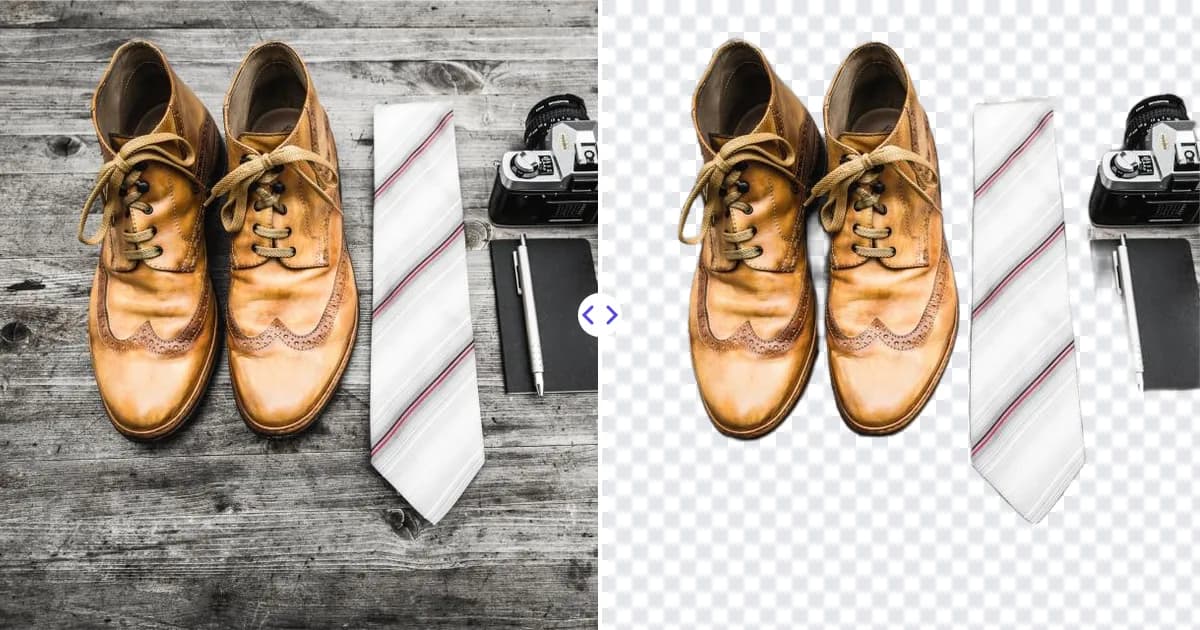
A background remover for Shopify makes every product in your store look like it came from the same photo shoot. Upload a product photo to Remove Photo Bg, the AI removes the background automatically, and you get a transparent PNG you can place on the color or scene that matches your theme.
Unlike some marketplaces, Shopify lets you design your own storefront, so there is no single required background. That freedom is exactly why consistency matters: mismatched backdrops make collection pages look messy and can lower trust.
Why background removal matters for a Shopify store
Your collection grid is the first thing many shoppers see. When one product sits on a kitchen counter, the next on a bedsheet and the third on a gray wall, the page feels improvised. Clean, uniform product images help in several ways:
- Brand consistency - every product shares the same backdrop, whether that is white, a soft brand color or a subtle gradient.
- Theme flexibility - a transparent PNG adapts if you switch themes or redesign your color palette later.
- Faster browsing - shoppers compare products more easily when nothing distracts from the item itself.
- Reusable assets - the same cutout works for banners, email campaigns, social ads and paid placements.
How to prepare Shopify product images in 4 steps
- Upload a product photo. Open the background remover and choose a JPG, PNG or WEBP image up to 16 MB, from desktop or mobile.
- Let the AI remove the background. The product is detected automatically. Review the edges around fine details like fringe, lace or wire.
- Download the transparent PNG. Keep this file as your master asset for that product.
- Add your store backdrop and upload. Place the cutout on your chosen background in Canva, Photoshop or GIMP, export it at a consistent size and aspect ratio, and upload it in your Shopify admin.
Remove Photo Bg focuses on the cutout and does not add backgrounds itself. If you need help with the last step, see how to add a new background to a photo.
Tips for a uniform catalog
Pick one aspect ratio
Shopify themes usually display product images in a grid, and mixed shapes can create uneven rows or awkward cropping. Choose one ratio, such as square, and use it for every product. Check your theme's documentation for its recommended image size.
Keep the product scale similar
Position each cutout so it fills a similar share of the canvas. A small item floating in empty space next to a product that fills the frame looks inconsistent.
Photograph with contrast and soft light
A plain backdrop that differs from your product's color, plus diffused light, gives the AI clean edges to work with. Our product photography tips for ecommerce cover simple home setups.
Upscale small supplier photos
Supplier or older photos are sometimes too small for zoom features. Run them through the AI image upscaler to enlarge them 4× before you build the final image.
Keep a master file for every product
Store each transparent PNG in a folder named after the product or SKU. When you change your backdrop color for a seasonal sale or a rebrand, you can recompose every image from the masters instead of reshooting.
Mind file size
Large images can slow your storefront. After composing your final image, export it at the size your theme actually needs rather than at maximum resolution.
Use cases for Shopify merchants
- Main product images and variant photos for each color or style.
- Collection page banners featuring several products together.
- Homepage hero sections with a product placed over a brand-colored panel.
- Email marketing images and abandoned-cart reminders.
- Social media ads and organic posts that link back to product pages.
If you also sell on marketplaces, the same transparent PNG can be placed on pure white for listings there. See our page on the background remover for Amazon for marketplace-specific advice.
Why use Remove Photo Bg for your store images
Running a store means juggling inventory, shipping and customer service, so image editing has to be quick. An AI cutout removes the slowest part of product photo editing and gives you a consistent master file for every item. Processing runs on our own servers, so your product photos are not sent to third-party AI services, and the tool works in any modern browser without installing anything.
Ready to tidy up your catalog? Remove the background from your first product photo and build a store that looks consistent from the homepage to checkout.