Upscale Image 4x Online - Four Times the Width and Height with AI
Upscale an image 4x online: 500 px becomes 2000 px, with AI-restored sharpness. See what 4x means, output limits and which images benefit most.
4 min read
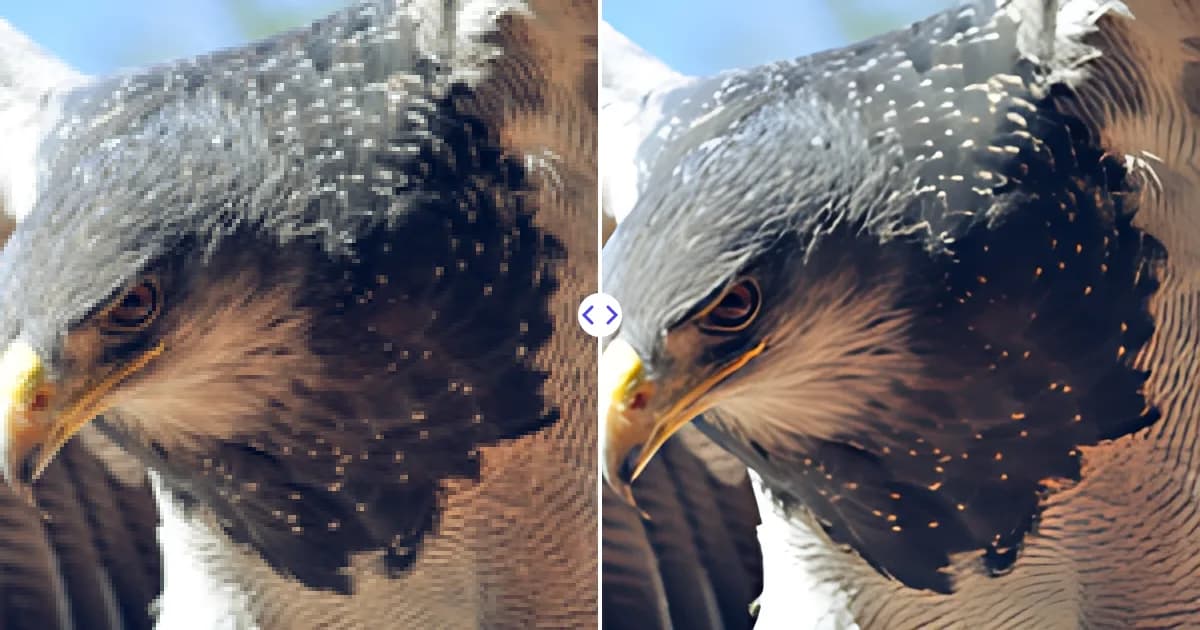
To upscale an image 4x, upload it to the Remove Photo Bg image upscaler. The AI multiplies both width and height by four, so 500 x 500 px becomes 2000 x 2000 px, and it sharpens edges and texture while doing it. Download the result in moments, free.
Supported formats are JPG, JPEG, PNG and WEBP up to 16 MB, in any modern browser on desktop or mobile.
What 4x upscaling means
A 4x upscale scales each side of the image by four. Because area grows with both dimensions, the image ends up with 16 times as many pixels. A few examples:
| Original | After 4x upscale | Pixel count |
|---|---|---|
| 256 x 256 px | 1024 x 1024 px | 65 K to 1 MP |
| 480 x 270 px | 1920 x 1080 px | 0.13 MP to 2.1 MP |
| 800 x 600 px | 3200 x 2400 px | 0.48 MP to 7.7 MP |
| 1024 x 768 px | 4096 x 3072 px | 0.79 MP to 12.6 MP |
The output is limited to 4096 px on the longest side. That means images up to 1024 px on their longest side get the full 4x; larger images are enlarged as far as that limit allows.
How to upscale an image 4x
- Open the upscaler. Go to the image upscaler.
- Upload your file. Select a JPG, JPEG, PNG or WEBP image up to 16 MB.
- Wait for the 4x upscale. The AI model enlarges and sharpens the image on our servers.
- Download. Save the 4x version and compare it with the original.
Why 4x and not just 2x?
Many tools offer 2x, which doubles each side. That is often not enough for small source images: a 400 px thumbnail at 2x is still only 800 px, too small for a full-screen display or a decent print. A 4x model covers the gap in a single step, turning thumbnails and web-sized images into files suitable for HD screens and small to medium prints.
A dedicated 4x model also tends to give better results than running a 2x upscale twice, because errors from the first pass would otherwise be magnified by the second.
What 4x upscaling can and cannot do
A 4x model has to create 15 new pixels for every original one. It does that by predicting what natural edges and textures should look like, based on training with many image pairs. On clean source images, the result looks convincingly sharp.
It cannot, however, recover information that was never in the file. Very small faces, distant text or heavy motion blur will be enlarged and cleaned up, but the fine specifics are an educated guess. Upscaling is reconstruction, not recovery. Our explainer what is AI image upscaling covers why.
A simple way to judge the result is to view both versions at the same display size. Put the original, stretched to the new dimensions in any viewer, next to the 4x output. Edges, hair, foliage and lettering are where the difference shows most. If a specific area looks too smooth or slightly invented, that is usually a spot where the source simply had too little information, and a larger original is the only real fix.
Images that benefit most from a 4x upscale
- Thumbnails and web images that you now need at full size
- Old digital photos from early cameras and phones with low megapixel counts
- AI-generated art, which is often produced at 512 or 1024 px
- Pixel-light graphics and icons that need to be reused in larger layouts
- Cropped photos where only a small part of the frame was kept
Tips for a clean 4x result
- Use the least compressed version of the image you have; compression blocks get sharpened too.
- Do edits like object removal before upscaling. The object remover works on the smaller file and you then enlarge the finished picture.
- If the source is already above 1024 px on its longest side, remember it will be capped at 4096 px.
- Check faces and lettering at 100% zoom before publishing or printing.
Need a specific display size? The convert image to HD page shows which source sizes reach 720p, 1080p and 4K. Printing large? See enlarge image without losing quality.
Upscale your image 4x now
Upload an image and get a version four times wider and taller, sharpened by AI, free in your browser.