Amazon Product Image Requirements: Main Image Rules Explained
A plain-English guide to Amazon product image requirements: white background, 85% frame fill, size for zoom, file formats and how to prepare compliant photos.
5 min read
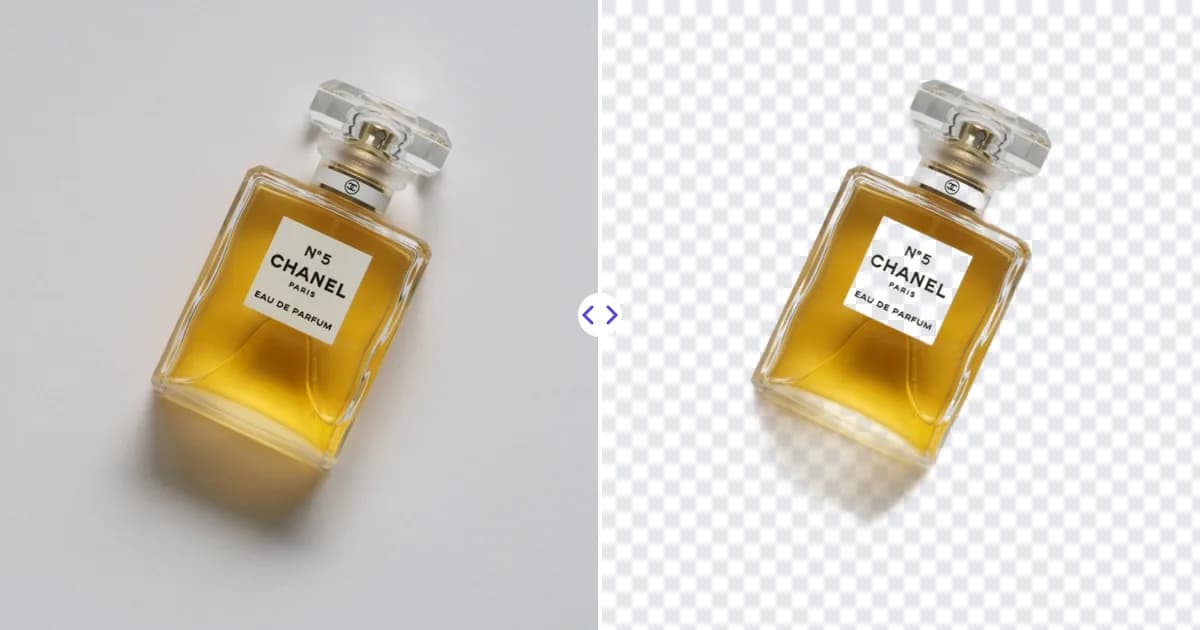
Amazon's main product image must show the product on a pure white background (RGB 255, 255, 255), with the product filling roughly 85% of the frame, and it should be at least 1000 pixels on the longest side so shoppers can zoom. Secondary images are more flexible and can show lifestyle scenes, details and infographics.
Below is a plain-English summary of the widely documented rules and a practical workflow for meeting them. Amazon updates its policies and some categories have their own rules, so always verify the details against the current image guidelines in Seller Central before you upload.
The main image rules
The main image is the one shown in search results and at the top of the product page. It has the strictest requirements because Amazon wants search results to look uniform and trustworthy. The commonly cited rules are:
- Pure white background. The background must be pure white, RGB 255, 255, 255. Light gray or off-white is not the same thing and can get a listing flagged.
- Product fills about 85% of the frame. The product should take up most of the image, not float small in the middle of a large white space.
- Only the product being sold. No extra props, accessories that are not included, or items that could confuse the buyer.
- No text, logos, badges, watermarks or graphics added on top of the image. Branding that is physically printed on the product or its packaging is fine.
- A real photograph of the actual product, not a drawing or illustration, and showing the whole product without cropping it off at the edges.
- Professional, in-focus and realistically colored. The image should accurately represent what the customer receives.
Some categories, such as apparel, have additional rules about how clothing is displayed. Check your category's style guide in Seller Central.
Size, resolution and file format
Amazon's zoom feature lets shoppers hover over or pinch the image to inspect details. To enable it, the image is generally recommended to be at least 1000 pixels on its longest side. Many sellers use 1600 px or 2000 px or larger, which makes zoomed views sharper.
- Dimensions: at least 1000 px on the longest side is the commonly recommended minimum for zoom. Square images are popular because they display consistently in search results.
- Formats: JPEG is the most common choice. Amazon also accepts formats such as PNG, TIFF and GIF (non-animated), but confirm the current list in Seller Central.
- Color mode: sRGB is the safe choice for web display.
- File naming: Amazon uses specific naming conventions when you upload images in bulk. Follow the format described in Seller Central.
If your only photo of a product is too small, for example a 600 px supplier image, you can enlarge it with an AI image upscaler. It increases the pixel dimensions 4× while restoring sharper edges, which is better than simply stretching it in an image editor. Starting from a good original is still best.
Secondary image rules
Amazon lets you add several more images after the main one. These do not need a white background and are your chance to sell the product. Common types include:
- Other angles: back, side, top and underside.
- Close-ups of materials, stitching, buttons or ports.
- Lifestyle photos showing the product in use.
- Scale images with a hand or a familiar object for size.
- Infographics with short feature callouts or dimensions.
- Packaging and everything included in the box.
Secondary images still must not be misleading, offensive, or include content that breaks Amazon's general policies, such as references to competitors or unverified claims.
How to get a pure white background
Getting a true RGB 255, 255, 255 background straight out of the camera is hard. Even a well-lit white sweep usually comes out slightly gray in shadows or corners. There are two practical approaches.
Option 1: Shoot on white and correct exposure
With strong, even lighting on both the product and the background, you can raise exposure until the background clips to pure white. This works for studio setups but often washes out light-colored products.
Option 2: Remove the background and place on white
The more reliable method for most sellers is to cut the product out and put it on a pure white canvas:
- Photograph the product on a plain, light, evenly lit background.
- Upload the photo to our background remover. The AI detects the product and gives you a PNG with a transparent background.
- Open the PNG in an editor such as Photoshop, GIMP or Canva and create a square canvas filled with pure white (hex #FFFFFF).
- Place the product on the canvas and scale it so it fills about 85% of the frame.
- Export as a high-quality JPEG at 1000 px or more on the longest side.
Because the product is cut out, the background is exactly white with no gray gradients. You can also reuse the same transparent PNG for other marketplaces with different requirements. For a dedicated walkthrough, see our background remover for Amazon page.
Checking your image before upload
A quick check before you upload can save a suppressed listing:
- Sample the background color. Use the eyedropper tool in your editor on several points of the background, including corners. Every point should read 255, 255, 255.
- Check the fill. The product should reach close to the edges on its longest side, leaving only a small margin.
- Look for leftovers. Remove any props, shadows that look like dirt, or text overlays.
- Zoom to 100%. Edges should be clean, without halos, jagged pixels or leftover background fragments.
- Confirm dimensions are at least 1000 px on the longest side.
Common reasons main images get flagged
- An off-white or light gray background instead of pure white.
- The product appearing too small in the frame.
- Added text such as sale badges, best seller labels or watermarks.
- Showing multiple products or accessories that are not included.
- Placeholder images or illustrations instead of a real photo.
- Images that are blurry, pixelated or too small for zoom.
Prepare your Amazon images
Meeting Amazon's main image rules comes down to three things: a clean cutout, a pure white canvas and enough resolution. Start by taking a sharp photo using our product photography tips for ecommerce, then remove the background for free and place the product on white. For more on the format you are exporting, read what is a transparent PNG. Before publishing, double-check every requirement against Amazon's current Seller Central guidelines, since rules can change and vary by category.